Ice Cream Calc
  • Recipes
  • Learn
  • Desktop app
Open the Web App

Desktop help

Getting started4

  • How to create a balanced recipe
  • Installation
  • Introduction
  • Quick Start Guide

Guides4

  • AI Meets Ice Cream Calc
  • Balancing
  • Reports
  • Working with bases

Tutorials13

  • Adjusting the recipe
  • Converting a recipe
  • Create an ingredient from a recipe
  • Customizing Tutorial
  • Fine tuning a recipe
  • Getting started
  • Ingredient Tutorial
  • Ingredients database explained
  • Language translation support
  • Nutrition Facts Label Tutorial
  • Production planning
  • Reverse Engineering Tutorial
  • Simple tutorial
  • Show all 13 tutorials

Dialogs91

  • Add Product Dialog
  • Add Weight Dialog
  • Addins Dialog
  • Alcohol Dialog
  • Baker's Percentage Dialog
  • Batch Numbers Dialog
  • Caramel Dialog
  • Chocolate Database Dialog
  • Chocolate Dialog
  • Close Production Dialog
  • Close Stocktaking Dialog
  • Compare Chart Dialog
  • Compare Data Dialog
  • Cost Calculator Dialog
  • Cost Dialog
  • Create Base Dialog
  • Data Dialog
  • Density Dialog
  • Edit Chart Dialog
  • Edit chart panel dialog
  • Edit Data Dialog
  • Edit Files Dialog
  • Edit map dialog
  • Edit Product Dialog
  • Edit Production Planning Dialog
  • Edit radar chart dialog
  • Edit RCPX Dialog
  • Edit Stocktaking Dialog
  • Evaporate Ingredient Dialog
  • Evaporation dialog
  • Find Product Dialog
  • Food Data Central Dialog
  • Formula Dialog
  • Freezing Curve Dialog
  • GPT Create Recipe Dialog
  • Handle Ingredients Allergens Dialog
  • Import Ingredients Dialog
  • Ingredient Allergens Dialog
  • Ingredient Database Dialog
  • Ingredient Dialog
  • Ingredient from AI Dialog
  • Ingredient Used In Dialog
  • Inventory Dialog
  • LUA Editor Dialog
  • Main Dialog
  • Modify Weight Dialog
  • New Dialog
  • Note Dialog
  • Nutrient Balance Chart Dialog
  • Nutrient Label Dialog
  • Nutrients Dialog
  • Online Charts Dialog
  • Online Recipe Dialog
  • Online Recipes Dialog
  • Overrun Dialog
  • PAC/POD Dialog
  • Perceptual map dialog
  • Print Dialog
  • Produce Dialog
  • Product Item Dialog
  • Production Planning Dialog
  • Radar chart dialog
  • Rate Dialog
  • Ratio Dialog
  • RCPX Dialog
  • RCPX Filter Dialog
  • Rearrange Dialog
  • Recent Recipes Dialog
  • Recipe Properties Dialog
  • Recipe user data dialog
  • Recipes Dialog
  • Register Online Recipe Dialog
  • Replace Milk And Cream Dialog
  • Report Add Dialog
  • Report Settings Dialog
  • Report Tags Dialog
  • Reports Dialog
  • Rescale Dialog
  • Select Ingredients Dialog
  • Select Milk Cream Dialog
  • Settings Dialog
  • Stabilizers Dialog
  • Stocktaking Dialog
  • Tags Dialog
  • Track Product Dialog
  • Translate Dialog
  • Visible Columns Dialog
  • Volume Dialog
  • Weight grid dialog
  • Wizard Dialog
  • Wizard Ingredients Dialog
  • Show all 91 dialogs

No help articles match your search.

  1. Desktop help
  2. Dialogs

Note Dialog

Windows desktop

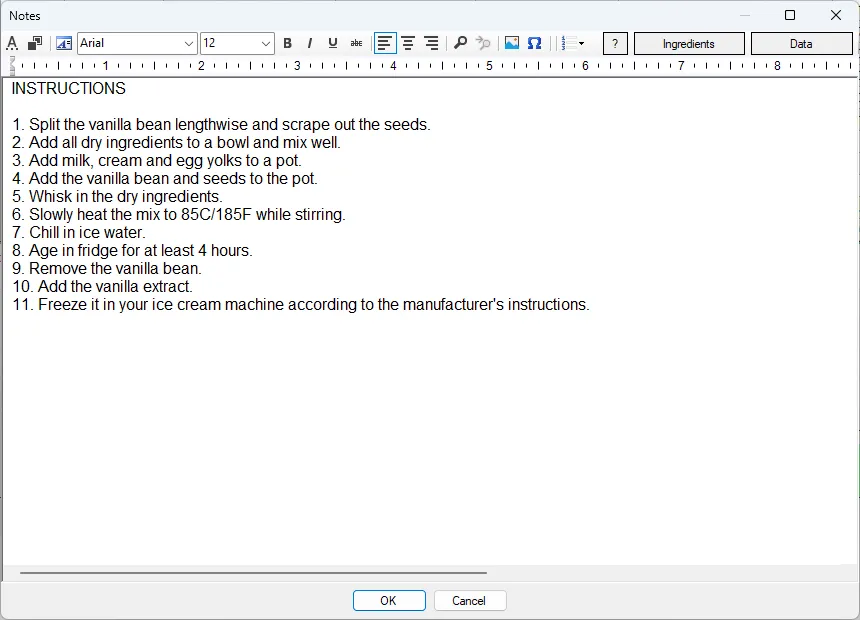
Screenshot: Note Dialog

If you need more advanced editing possibilities the built in editor can be used.

← PreviousNew DialogNext →Nutrient Balance Chart Dialog
Ice Cream Calc

Recipe development software for ice cream, gelato and sorbet. Referenced in Goff & Hartel, Ice Cream, 8th edition.

Explore
  • Recipes
  • Knowledge Base
  • Web App
Desktop app
  • Download
  • Desktop help
  • Tutorials
  • Move to the Web App
Get in touch
  • Contact
  • Facebook group
© IcyLabs Software ABMade in Sweden
Opens in a new tab