Ice Cream Calc
  • Recipes
  • Learn
  • Desktop app
Open the Web App

Desktop help

Getting started4

  • How to create a balanced recipe
  • Installation
  • Introduction
  • Quick Start Guide

Guides4

  • AI Meets Ice Cream Calc
  • Balancing
  • Reports
  • Working with bases

Tutorials13

  • Adjusting the recipe
  • Converting a recipe
  • Create an ingredient from a recipe
  • Customizing Tutorial
  • Fine tuning a recipe
  • Getting started
  • Ingredient Tutorial
  • Ingredients database explained
  • Language translation support
  • Nutrition Facts Label Tutorial
  • Production planning
  • Reverse Engineering Tutorial
  • Simple tutorial
  • Show all 13 tutorials

Dialogs91

  • Add Product Dialog
  • Add Weight Dialog
  • Addins Dialog
  • Alcohol Dialog
  • Baker's Percentage Dialog
  • Batch Numbers Dialog
  • Caramel Dialog
  • Chocolate Database Dialog
  • Chocolate Dialog
  • Close Production Dialog
  • Close Stocktaking Dialog
  • Compare Chart Dialog
  • Compare Data Dialog
  • Cost Calculator Dialog
  • Cost Dialog
  • Create Base Dialog
  • Data Dialog
  • Density Dialog
  • Edit Chart Dialog
  • Edit chart panel dialog
  • Edit Data Dialog
  • Edit Files Dialog
  • Edit map dialog
  • Edit Product Dialog
  • Edit Production Planning Dialog
  • Edit radar chart dialog
  • Edit RCPX Dialog
  • Edit Stocktaking Dialog
  • Evaporate Ingredient Dialog
  • Evaporation dialog
  • Find Product Dialog
  • Food Data Central Dialog
  • Formula Dialog
  • Freezing Curve Dialog
  • GPT Create Recipe Dialog
  • Handle Ingredients Allergens Dialog
  • Import Ingredients Dialog
  • Ingredient Allergens Dialog
  • Ingredient Database Dialog
  • Ingredient Dialog
  • Ingredient from AI Dialog
  • Ingredient Used In Dialog
  • Inventory Dialog
  • LUA Editor Dialog
  • Main Dialog
  • Modify Weight Dialog
  • New Dialog
  • Note Dialog
  • Nutrient Balance Chart Dialog
  • Nutrient Label Dialog
  • Nutrients Dialog
  • Online Charts Dialog
  • Online Recipe Dialog
  • Online Recipes Dialog
  • Overrun Dialog
  • PAC/POD Dialog
  • Perceptual map dialog
  • Print Dialog
  • Produce Dialog
  • Product Item Dialog
  • Production Planning Dialog
  • Radar chart dialog
  • Rate Dialog
  • Ratio Dialog
  • RCPX Dialog
  • RCPX Filter Dialog
  • Rearrange Dialog
  • Recent Recipes Dialog
  • Recipe Properties Dialog
  • Recipe user data dialog
  • Recipes Dialog
  • Register Online Recipe Dialog
  • Replace Milk And Cream Dialog
  • Report Add Dialog
  • Report Settings Dialog
  • Report Tags Dialog
  • Reports Dialog
  • Rescale Dialog
  • Select Ingredients Dialog
  • Select Milk Cream Dialog
  • Settings Dialog
  • Stabilizers Dialog
  • Stocktaking Dialog
  • Tags Dialog
  • Track Product Dialog
  • Translate Dialog
  • Visible Columns Dialog
  • Volume Dialog
  • Weight grid dialog
  • Wizard Dialog
  • Wizard Ingredients Dialog
  • Show all 91 dialogs

No help articles match your search.

  1. Desktop help
  2. Dialogs

Edit chart panel dialog

Windows desktop

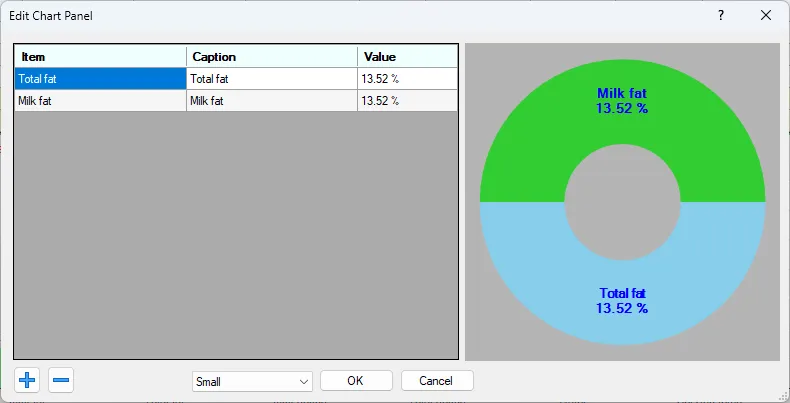
Screenshot: Edit chart panel dialog

The Edit chart panel dialog let’s you create Donut Chart comparing multiple data points.
Select the data you like to compare and the size of the panel (Small, Medium or Large).

← PreviousEdit Chart DialogNext →Edit Data Dialog
Ice Cream Calc

Recipe development software for ice cream, gelato and sorbet. Referenced in Goff & Hartel, Ice Cream, 8th edition.

Explore
  • Recipes
  • Knowledge Base
  • Web App
Desktop app
  • Download
  • Desktop help
  • Tutorials
  • Move to the Web App
Get in touch
  • Contact
  • Facebook group
© IcyLabs Software ABMade in Sweden
Opens in a new tab